
| |
EDI Viewer - FCC Explorer |
FCC Explorer is the main naviagation window for the Allowable Costs module.
There are five FCC Explorer views, Operated FCCs, Operated Facilities, All FCCs, All Facilities, and Cost Center. On the right hand side of the window, the Explorer Top Level section shows you which view you are using. To change from Facility to FCC view, click the FCC button and vise versa.
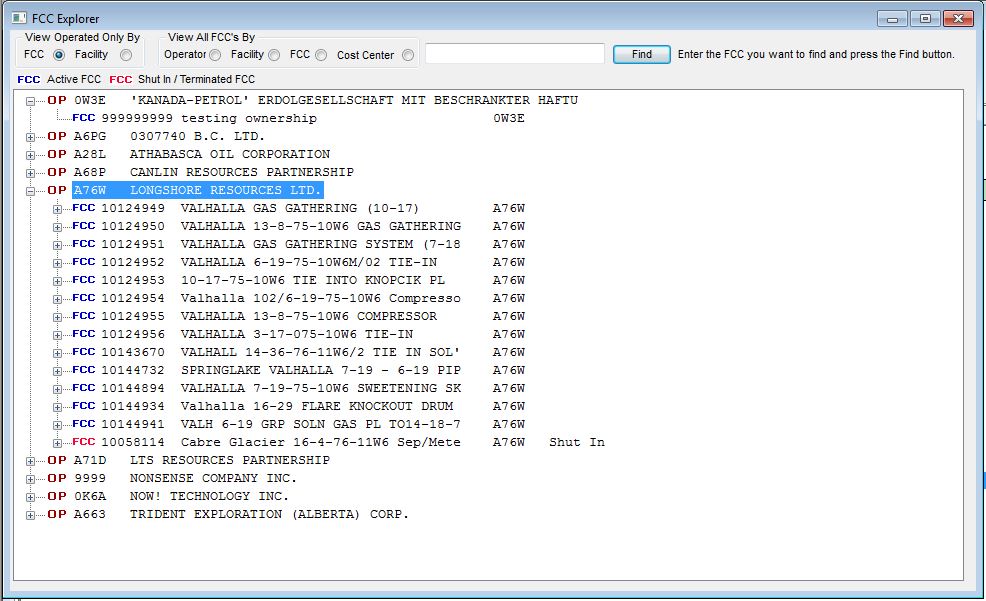
After you highlite a facility or facility cost center by clicking on it, click a toolbar bar item to see that information for the FCC you have chosen. For example, if you click the AC1 toolbar button, you will be able to view all AC1 forms for this FCC; clicking the AC2 toolbar item shows you all AC2 forms for this FCC, etc..
Clicking on the + sign or double-clicking on any facility will expand your view to see all facility cost centers linked to that facility. Clicking on the + sign or double-clicking on a facility cost center will expand to show you the current ownership of that facility cost center.
If you have a long list of facilities or facility cost centers, instead of scrolling to find the one you want, enter part of the name in the edit box above the Find button and click the Find button. You do not have to enter the complete name you are searching for.
For example, entering 012 and clicking Find would take you to the first facility or facility cost center that had 012 anywhere it the description show on the FCC Explorer list.